Understands your system. Works with your tools.
Nothing to migrate. Nothing to replace.
For teams on IBM DOORS Next, Siemens Polarion, PTC Codebeamer, PTC Windchill and Jama Connect.
- IBM DOORS Next
- Siemens Polarion
- PTC Codebeamer
- PTC Windchill
- Jama Connect
Requirements platforms
- Automated traceabilityLink graph · Missing-link detection
- Compliance analysisASPICE
- Intelligent generationRequirements · Tests · Attributes
- Smart search and bulk operationsNatural language · Mass actions
Deterministic NPLF · Human in the loop
- Traceability coverage
- Compliance gap reports
- Generated requirements and tests
- Natural-language insights
- Approved updates
Export · DOCX
- Augment, don't replace
- Your data stays in your ALM
- Zero migration
Product
Cadenza works as an engineering brain over the toolchain a team already uses.
It connects to IBM DOORS Next and Siemens Polarion through their own APIs, understands how requirements, tests and links connect across the levels, finds gaps and inconsistencies, and does the work inside those tools: it writes fixes back in bulk.
Every change is approved by the user, logged with the value before and after, and can be undone. Nothing has to be migrated.
Creating an item or adding a comment can't be undone from Cadenza. The screen says so before you approve.
Connect. Scan. Detect. Act.
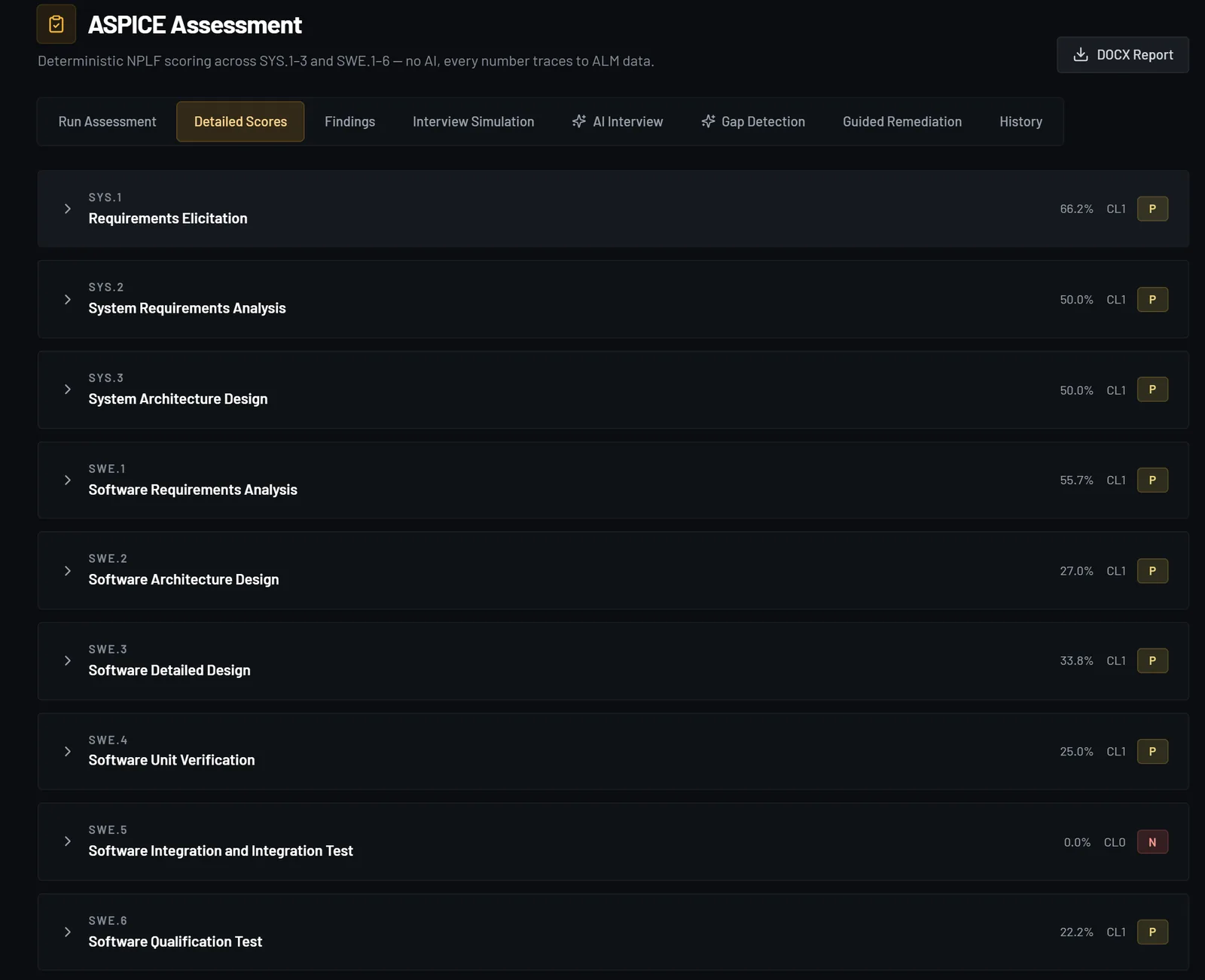
Screens from CDrivePilot, a demo project we seeded in Polarion. The data is synthetic.
01 Connect
Sign in with the account you already use and pick a project. Cadenza reads your items where they are.
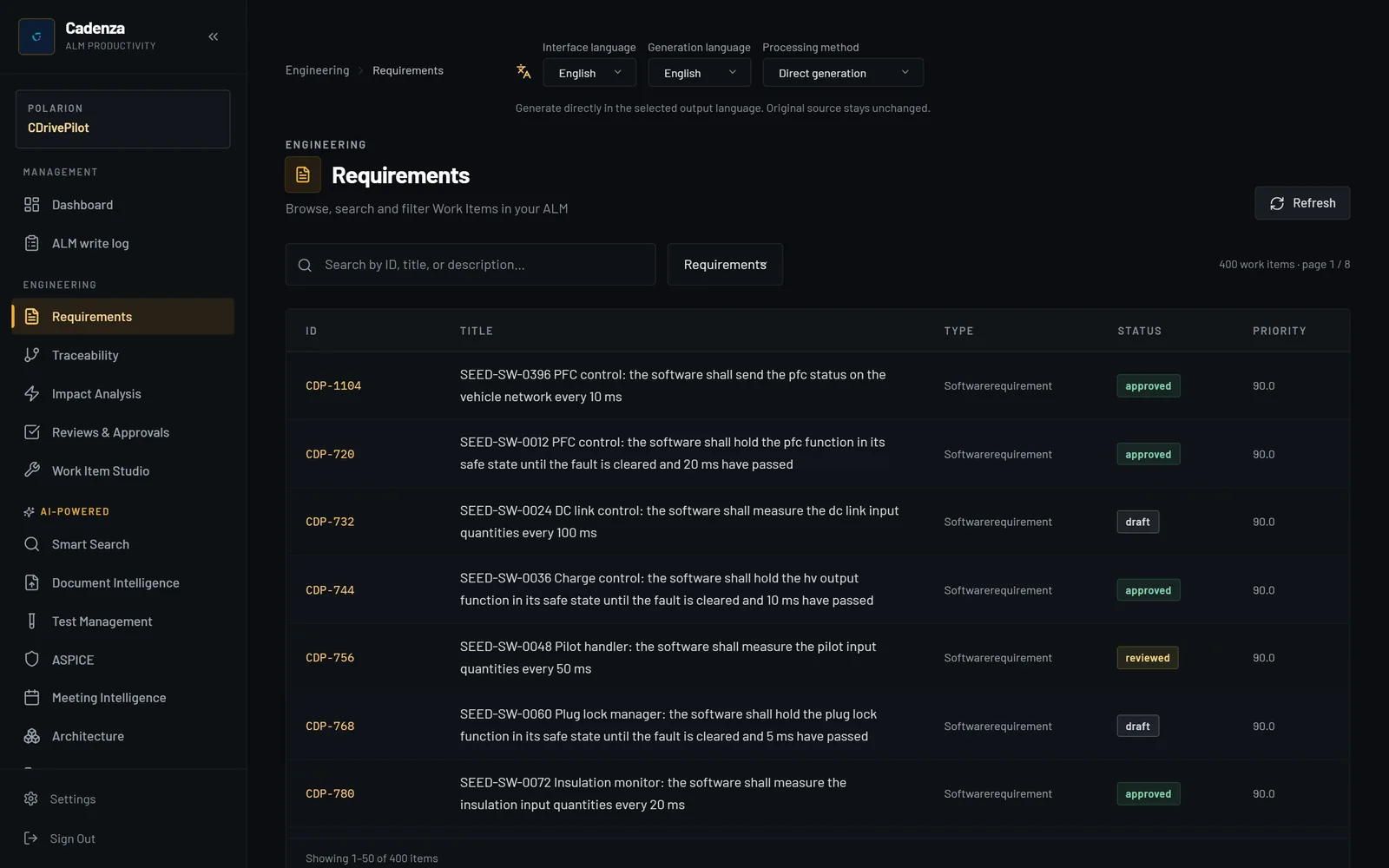
02 Scan
Cadenza reads requirements, tests and tasks with every link between them, level by level, and shows what is covered and what is not.
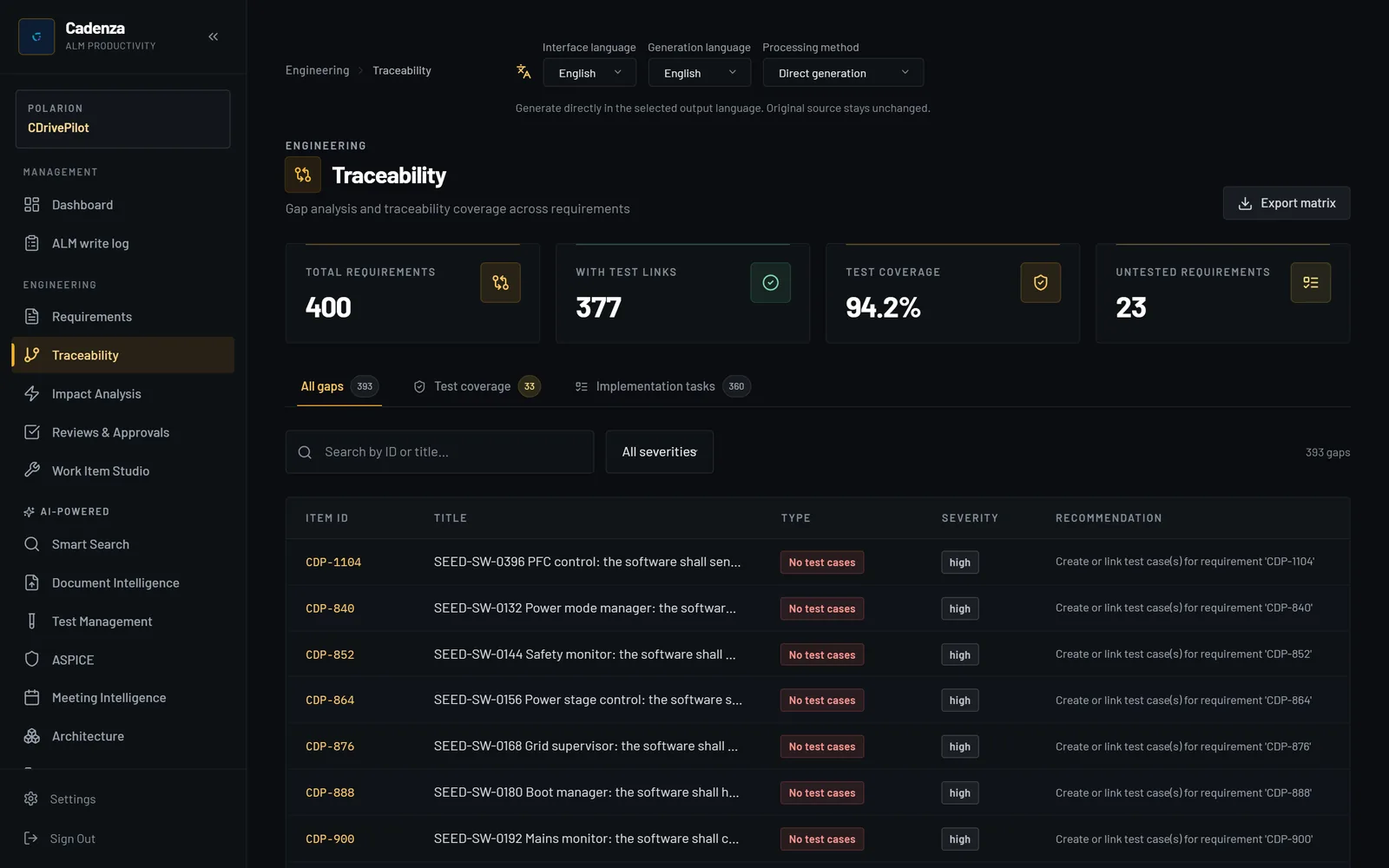
03 Detect
Pick an item and see what a change to it touches, level by level. AI drafts a suggested action for each affected item, for you to review.
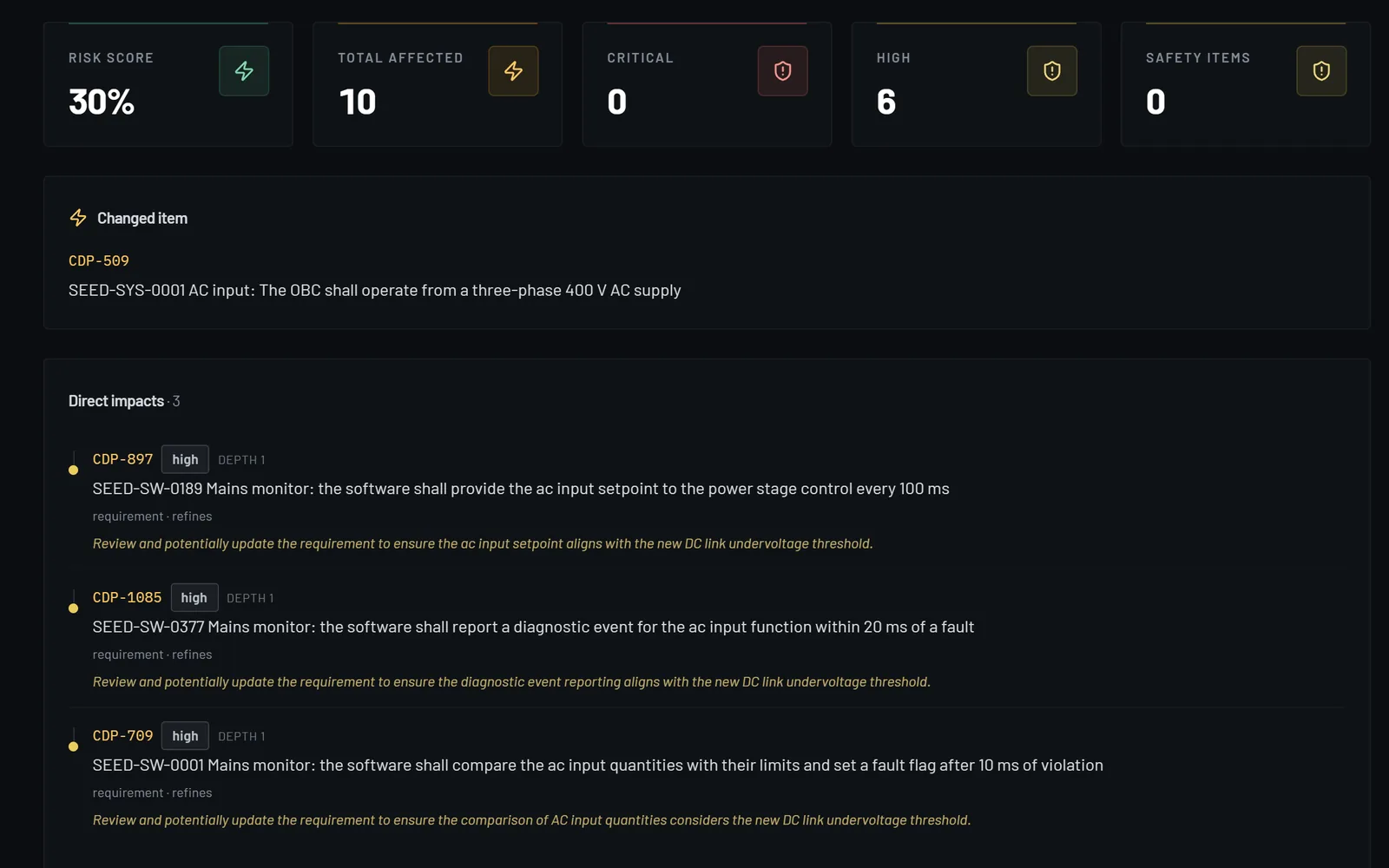
04 Act
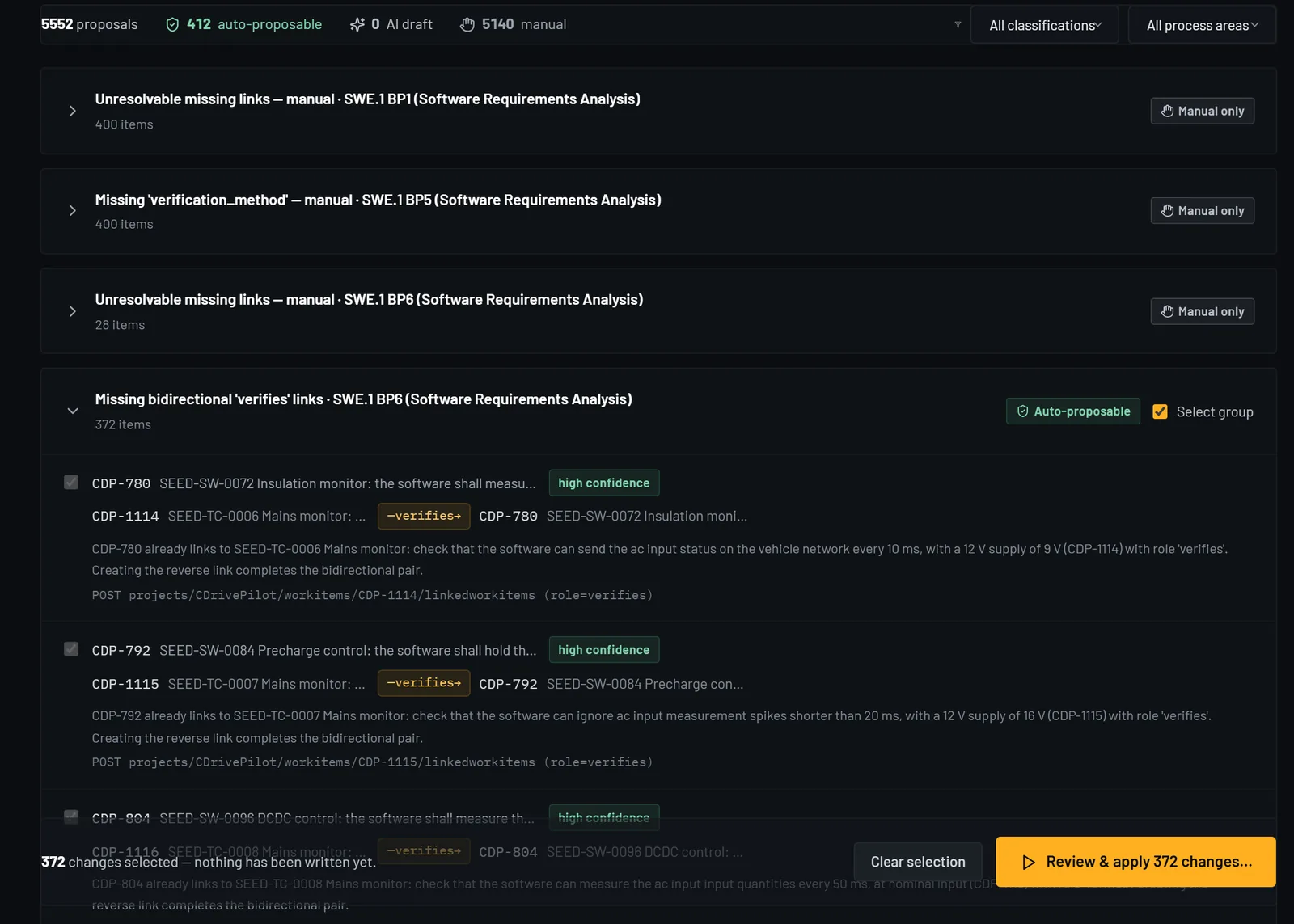
Gaps come back as proposed fixes, grouped by kind. Select a group, check each value before and after, and approve once.
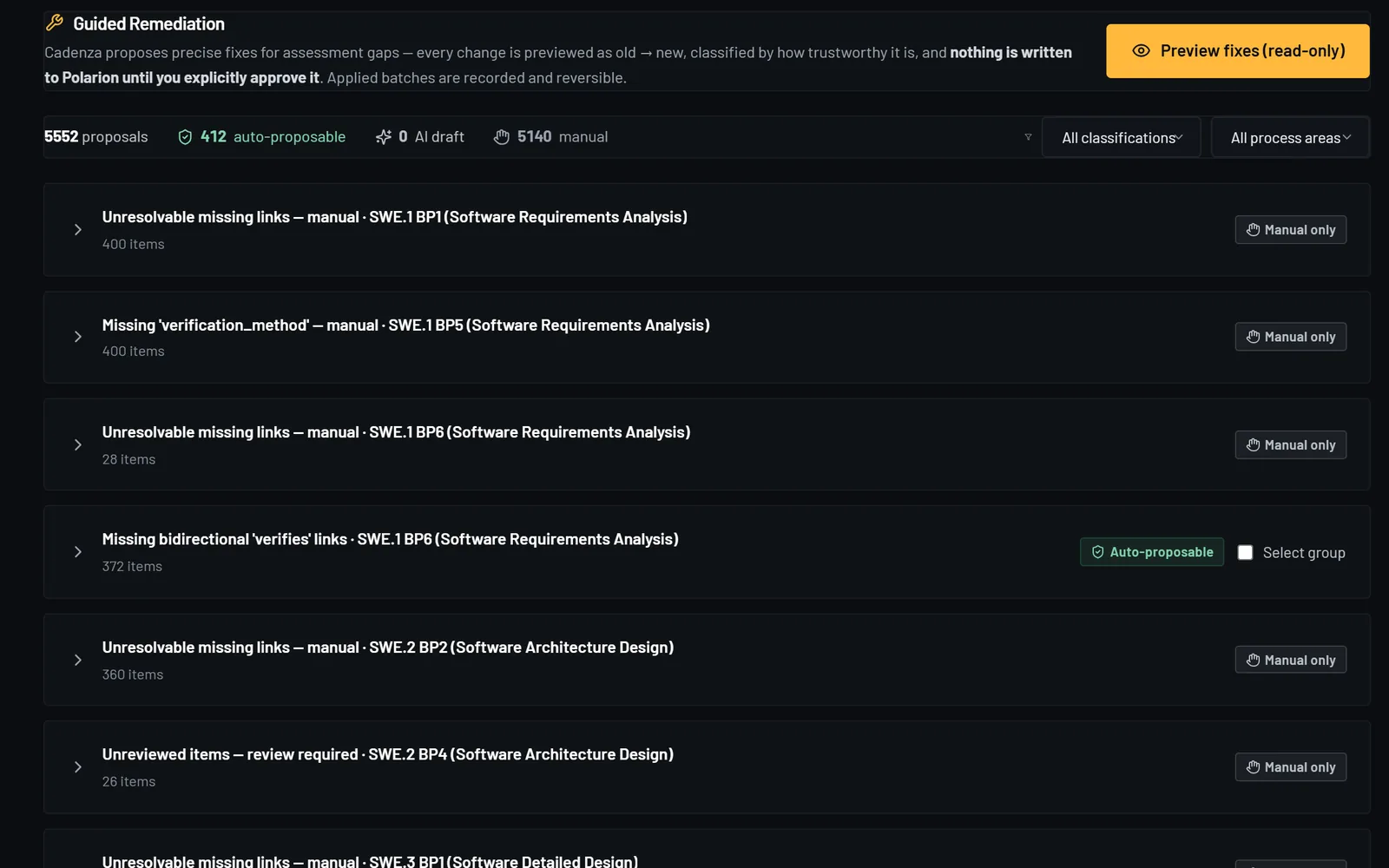
Capabilities
Off your desk.
The checking, the clicking and the copying between tools. You keep the engineering decisions.
See how everything connects.
Cadenza reads every requirement, test and task with its links, across the system and software levels, so you see the whole chain in one place instead of opening item after item.
Find the gaps before an assessor does.
Requirements without a test, tests without a requirement, links that are missing on one level. Cadenza lists them by level, so you know what to fix first.
Know what a change touches.
Pick an item and Cadenza follows its links level by level: which requirements, tests and tasks are affected. AI drafts a suggested action for each one, for you to review.
Check ASPICE evidence with fixed rules.
NPLF ratings for SYS.1 to SYS.3 and SWE.1 to SWE.6, computed from your project data with deterministic rules and no AI. The same data always gives the same rating.
Fix in bulk, inside your tools.
Guided Remediation turns the gaps into proposed fixes, such as a missing link or a missing priority. You select a group, check each change and approve the batch once. Cadenza writes it back to DOORS Next, Polarion, Codebeamer, Windchill or Jama Connect.
Keep a record. Undo when needed.
Every write is logged before it is sent, with the value before and after. You can undo a batch in one step, also after a restart. If someone changed the item since, the undo stops and says why.
Also in Cadenza
Ask in plain words.
Ask a question about your project in plain language. Questions about coverage, gaps and impact are answered from your project data.
Turn meeting notes into updates.
Paste stand-up or Kanban notes. Cadenza proposes status changes, comments and new tasks, and runs only the ones you approve.
Draft tests and requirements.
Generate test cases from a requirement, or extract requirements from a PDF or Word document. You review everything before it goes into your tool.
English or German.
Interface and AI output in English and German, chosen per user.
Reads and writes in bulk.
Pick a batch, check each value before and after, approve once. Cadenza writes through the tool's own API and keeps a record of every change.
- Trace links in one batch
- 250
- Fixed, approved and logged
- < 3 min
- To undo all of them
- 68 s
One approval. Not 250 edits.
Measured on a live Polarion server, full workflow included. Median of three runs.
- Preview
Each change is listed with its old and new value. Nothing is written yet.
- Approve
One approval for the batch you selected.
- Log
Each write is logged before it is sent, then with its outcome and the value read back.
- Undo
Undo the batch in one step, or a single write from the log, also after a restart. If someone changed an item since, that undo is refused, with the reason.
Some writes can't be undone from Cadenza, such as creating an item. The screen says so before you approve.
Integrations
On top of your ALM.
Cadenza connects to DOORS Next, Polarion, Codebeamer, Windchill or Jama Connect with the accounts your team already has. It reads items where they are and writes changes back through the tool's own API.
There is nothing to import and no copy to keep in sync. Your ALM stays the record your assessors check, and your team keeps working in it.
Your engineers work in the language they think in: English or German.
Start with one project. If you stop using Cadenza, everything it wrote is already in your ALM.
- DOORS NextIBM
- PolarionSiemens
- CodebeamerPTC
- WindchillPTC
- Jama ConnectJama Software
Security & compliance
Built for regulated industries.
Cadenza is designed for the same procurement reviews that gate your ALM rollouts.
SSO / SAML 2.0
Azure AD, Okta, Google Workspace, Keycloak.
Encryption in transit and at rest
TLS 1.3 in transit, Fernet at rest for ALM credentials.
Full audit log
Every read, write and approval: timestamped and queryable.
EU data residency
GDPR-aligned. Hetzner Nuremberg region by default.
Role-based access
Admin, user and viewer roles.
ISO 27001
Certification is on our roadmap.
Contact sales
Let's look at your project.
See Cadenza running against a live project in your ALM in 30 minutes. No deck, just the product.
Or write to contact@cadenza-alm.com.
- Licences
- Per user, monthly or annual. We send a quote for your team.
- AI
- Bring your own Azure OpenAI key. Inference runs on your tenant, and Microsoft bills you directly.
- Start small
- Ask us about a trial on one of your own projects.
- Language
- We work with your team in English or German.